Journal / Web product development
Wispr Flow and alternatives: voice dictation for developers
Topics
- AI
- Developer tools
- Voice dictation
Wispr Flow is a useful starting point if you want polished dictated prompts across supported devices and accept cloud transcription. On Linux, start by evaluating Handy for straightforward local dictation, OpenWhispr for a configurable local/cloud workflow, or Superwhisper's dedicated Linux offering. Choose Talon when the goal is controlling the computer by voice, not merely filling a prompt box. On a Mac, VoiceInk and MacWhisper also deserve a look before you commit to another subscription.
This is a documentation-based comparison, not a microphone benchmark or a claim of personal productivity gains. Sources and prices were checked on 11 November 2026; the scheduled publication date is 15 November 2026. Those dates are deliberately separate. Product pages can change before publication, and the checkout remains authoritative for taxes, currency and billing terms.
Dictate intent, not executable syntax
The strongest use case is explaining a task: observed behaviour, expected behaviour, constraints and acceptance criteria. That is often easier to say than to type while navigating an unfamiliar repository. Dictation does not remove the need to think; it changes how the first draft of that thinking enters the editor.
It is a weaker fit for exact identifiers, command flags, regular expressions and secrets. A recogniser can turn a plausible-sounding sentence into the wrong instruction without making it look broken. Missing “not” is more dangerous than missing punctuation. An automatic rewrite can also smooth away uncertainty that the agent needed to preserve.
Use voice for the explanation and the keyboard or editor picker for exact file references. Keep a visible review step between recognition and submission. The relevant metric is time to an accepted, unambiguous prompt, including corrections—not words per minute advertised on a landing page.
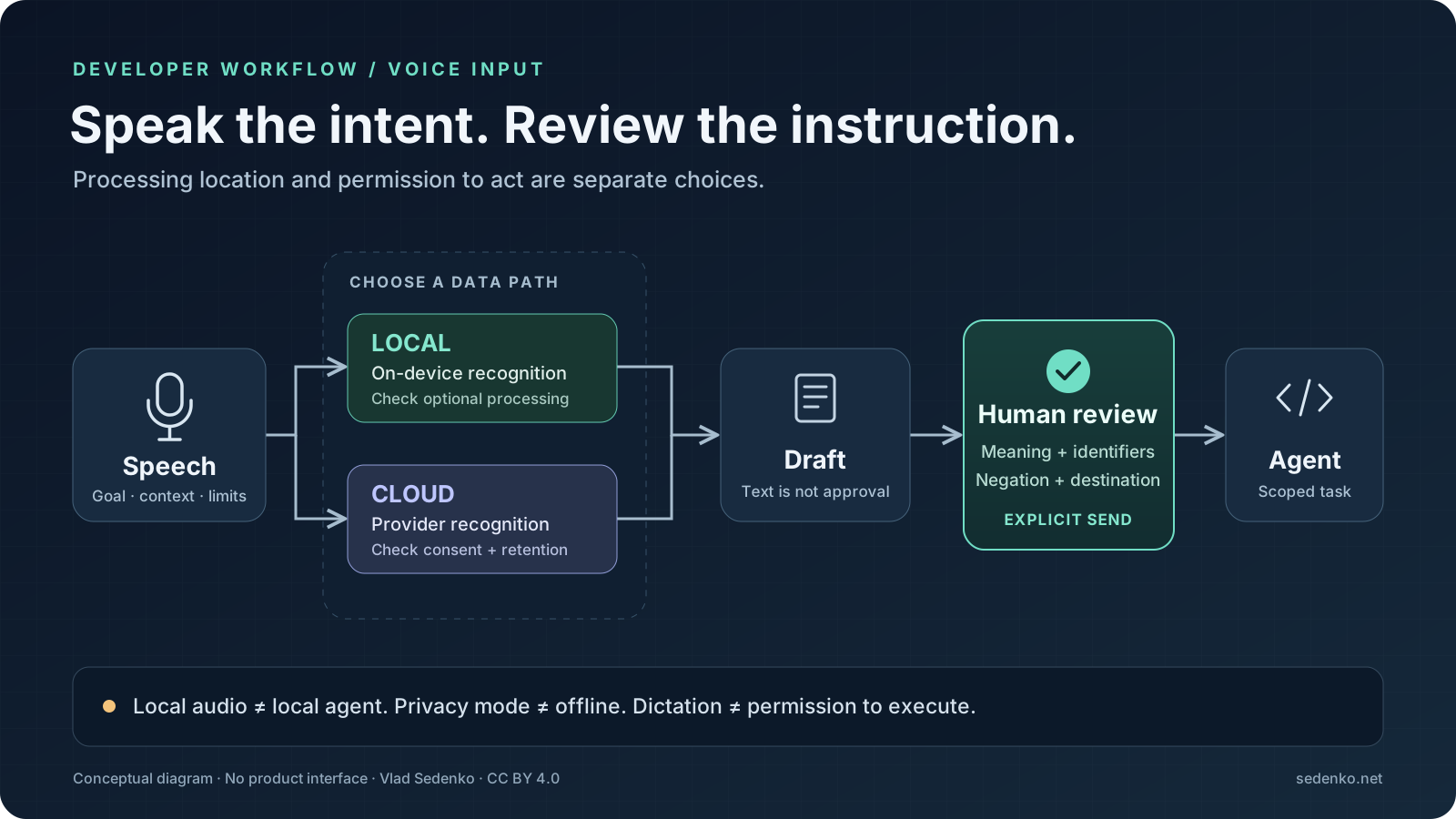
The diagram separates two decisions: where speech is processed and when text becomes an instruction. Local recognition does not make a downstream cloud coding agent local. Conversely, a cloud transcription service does not need permission to execute commands simply because it can type into an application.
Eight tools, different jobs
The table records the official material read on the verification date. “Local” describes an available processing path, not a blanket guarantee about every optional feature. Dollar figures are listed USD prices; annual equivalents are not monthly cancellation offers.
| Tool | Confirmed platforms | Processing distinction | Confirmed pricing information |
|---|---|---|---|
| Wispr Flow | Mac, Windows, iPhone, Android; Linux not listed | Cloud transcription, configurable storage and training preferences | Free: 2,000 words/week; Pro $15/user/month or $12/month billed annually |
| Superwhisper | Mac, Windows, iOS, Android; separate Linux page | Local and cloud models; Linux page also describes local processing | Free tier; Pro page displays $8.49/month; verify billing selection at checkout |
| MacWhisper | Mac | Local transcription plus optional cloud models and AI integrations | Free; Pro €64 per licence |
| VoiceInk | Apple Silicon Mac, macOS 14.4+ | Local voice transcription; optional cloud enhancement sends text | One-time $25 for one Mac, $39 for two, $49 for three |
| Aqua Voice | Mac, Windows, iOS, Android | Hosted service; Privacy Mode changes retention, not an offline claim | Free: 1,000 words; Pro $12/month or $10/month billed annually |
| Talon | Mac, Windows, Linux/X11 | Configurable speech engine and command scripts; no blanket locality claim here | Documentation confirms a free speech engine; paid offering not priced here |
| Handy | Mac, Windows, Linux | Local speech recognition; inspect optional post-processing separately | Free, open source |
| OpenWhispr | Mac, Windows, Linux | Local or cloud transcription and optional AI processing | MIT-licensed app, free for personal/commercial use; cloud costs separate |
Do not read Aqua's free allowance as weekly: the checked page says “1,000 free words”, without that renewal promise. Likewise, do not reduce Superwhisper to “Mac only”: its current official Linux page has a download, supported distributions and architecture information. Wispr's checked platform list does not include Linux; this is a statement about the reviewed offering, not a prediction about its roadmap.
Hosted convenience: Wispr Flow and Aqua Voice
Wispr's attraction is a consistent dictation workflow across its listed devices, with text cleanup rather than only literal transcription. Its pricing page separates monthly and annual Pro rates. Start with the free allowance to discover whether your technical vocabulary survives the cleanup before paying for volume.
Read the privacy explanation carefully. It explicitly says transcription always happens in the cloud. Turning off cloud storage changes what persists; it does not move recognition onto your laptop. The page distinguishes model improvement, dictation storage, local history and context awareness. Context awareness can read limited text from the target app, so audio is not the only relevant data category.
Aqua similarly needs a distinction between processing and retention. Its privacy policy says that with Privacy Mode disabled, dictation audio and transcripts are stored on its servers. With the mode enabled, those are not stored unless attached to feedback, while session metadata may still be collected. Meeting notes have separate rules. Do not turn “Privacy Mode” into “nothing leaves the device”.
For either service, try a sanitised task before using client material. Check the account policy, target application access and history settings. A technically accurate transcript is not sufficient if the workflow sends information to a provider your organisation has not approved.
Mac choices and Superwhisper's broader reach
Superwhisper offers both local and cloud models. That makes it a candidate for different privacy and hardware requirements, but also makes configuration part of the evaluation. An offline-capable product can still use a hosted model in the selected mode. Its Linux page is especially relevant here: it contradicts older shortlists that describe the application as exclusively macOS software.
The homepage displays Pro at $8.49 per month alongside monthly, yearly and lifetime selectors. I would not infer every alternative billing total from that extracted view. Check the selected period, device coverage and model access before buying. The free tier is a better starting point than assuming a paid plan guarantees accurate repository terminology.
MacWhisper is worth considering when live dictation sits alongside transcription of existing audio or video. Its official page documents local and cloud models, dictation and a free/Pro split. The €64 licence is not evidence that every external AI provider is included. Evaluate the path you actually intend to use rather than the broad promise of a “local” application.
VoiceInk makes the boundary particularly explicit: voice transcription is local, while optional Cloud Enhancement processes the resulting text. Its current requirements are Apple Silicon and macOS 14.4 or later. The one-time device tiers are attractive if a subscription is the wrong purchasing model, but suitability still depends on recognition, insertion reliability and whether enhancement is enabled.
Linux: recognition is only half the problem
Handy and OpenWhispr both provide Linux builds and local transcription options. Handy's project documentation focuses on a shortcut-to-text loop. OpenWhispr's repository describes a broader application with optional cloud providers, notes and AI features. Pick the smaller surface if you only need dictation; consider the broader one when its extra capabilities solve an actual task.
On Linux, successful recognition does not prove successful insertion. The display server, compositor, global shortcut and focus behaviour all matter. Handy documents limited Wayland support and different input helpers. It specifically warns that the recording overlay can steal focus and send the paste to the wrong window. Test the browser prompt box and editor separately, using harmless text.
For an existing Sway setup, the following binding is taken from Handy's documented CLI approach. It is a real compositor configuration line, not a fictional application setting:
bindsym $mod+o exec handy --toggle-transcription
Add it to your Sway configuration only after installing Handy, confirming the executable is available and checking that the key combination is unused. Reload the compositor configuration, start Handy, focus a disposable text document and test start/stop behaviour. This toggles recording; it neither submits a prompt nor presses Enter for you.
The shortcut does not install the necessary text-input helper. Follow the current project instructions for your compositor: do not assume a Wayland recipe works identically on GNOME and Sway. Avoid adding broad input-device permissions merely to silence an error without understanding their scope. Handy also warns against old signal-based examples using USR1; the documented CLI flag avoids copying that obsolete workaround.
Talon addresses a different need. Its official getting-started guide requires command scripts and a speech engine, and identifies Linux/X11 support while saying Wayland support is not planned. That learning investment can make sense for hands-free navigation and editing. It is excessive if the only goal is occasionally dictating a paragraph into an agent chat. This comparison does not claim that every Talon engine or user script has identical data handling.
A prompt pattern that survives speech
Dictate in short semantic blocks. State the goal, evidence, boundary and verification separately, then add exact references through the editor. For example:
Investigate why an expired invitation can still be accepted. First explain the current validation path. Do not edit files yet. Preserve the public response format. Propose a regression test for an expired invitation and one for a valid invitation. If the intended behaviour is unclear, identify the missing decision instead of guessing.
After reviewing the explanation, a second prompt can authorise a bounded change:
Implement the agreed validation fix only. Keep unrelated changes intact. Run the relevant existing tests and report their actual results. Do not deploy, change credentials or rewrite the authentication module. Explain any check you could not run.
These are suggested prompts, not evidence that an agent will obey every boundary. Pair them with actual permissions and isolation. The first prompt prevents a transcription mistake from immediately becoming a patch; the second gives the reviewer a concrete contract.
For mixed-language speech, keep ordinary explanations in the language you use naturally and insert exact identifiers afterwards. Try your real vocabulary: framework names, acronyms, customer-neutral domain terms and negative instructions. A dictionary can improve spelling, but it cannot decide whether you meant to keep or remove a compatibility guarantee.
A safe trial and a practical decision
Start with a small set of representative tasks: a bug explanation, a constrained refactor and a review comment. Use the same microphone, environment and task content when comparing tools. Include a deliberately important negation, an identifier and a language switch. Record correction time, failed pastes and whether cleanup changed meaning; do not award points simply for producing longer text.
Keep auto-submit off where available and avoid dictating into a live shell. A newline can have a very different consequence there than in a scratch document. Read the final text, verify the destination and send it deliberately. Disable unnecessary history, clipboard synchronisation and cloud enhancement when the project requires it. Local audio processing does not protect text subsequently copied to an unapproved service.
For teams, document an allowed-data rule and a fallback to typing. Dictation is not equally comfortable in an open office, a shared home or a meeting. Accessibility needs also differ: a voice-control system and a fast prompt-entry tool should not be judged against the same acceptance criteria. Do not make speaking a compulsory development habit.
My recommendation is to buy only after the complete loop works: recording, recognition, insertion, correction and reviewed submission. Choose Wispr or Aqua for an approved hosted workflow, a configured local option when the data boundary demands it, and Talon when computer control is the objective. If introducing this into a team is harder than installing the app, AI consulting can help define a bounded pilot and data-handling rules before rollout.
Sources
Official pages and repository documentation read on 11 November 2026. Product capabilities are vendor statements, not independently measured accuracy results.
- Wispr Flow: platforms and free allowance, pricing, processing and privacy controls.
- Superwhisper: models, platforms and pricing, Linux offering.
- MacWhisper: features, local/cloud models and licence price.
- VoiceInk: requirements, device tiers and optional enhancement.
- Aqua Voice: plans and platforms, privacy and retention.
- Talon: product, official getting-started guide.
- Handy: README, Linux limitations and CLI bindings.
- OpenWhispr: README, platforms, processing choices and MIT licence.