Journal / Web product development
VS Code extensions in 2026: what to keep, what to remove
Topics
- Developer tools
- VS Code
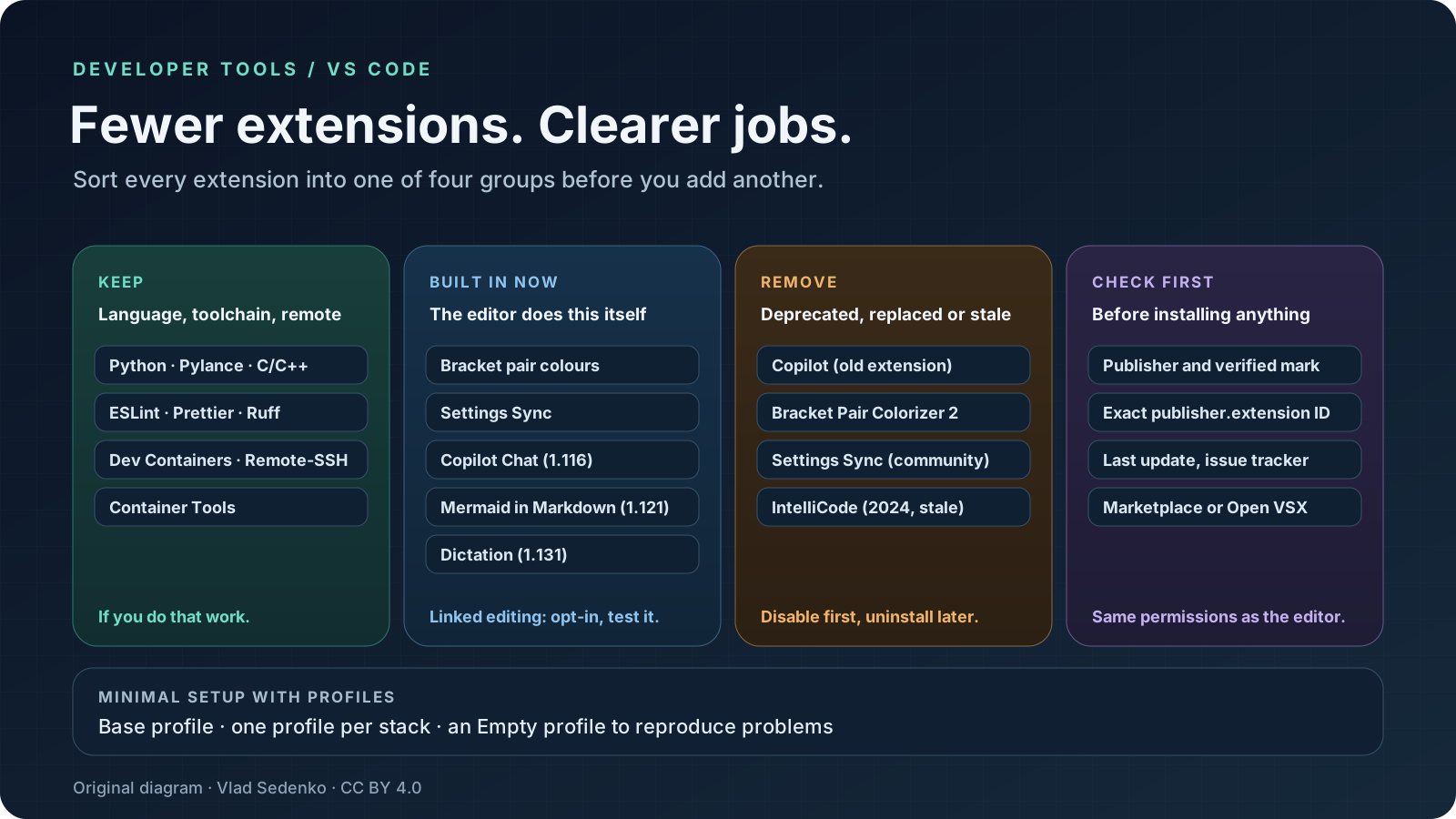
Most lists of the best VS Code extensions only tell you what to add. In 2026 the more useful question is what to take out. Keep the extensions that supply a language, a toolchain or a remote environment. Test the ones whose job VS Code now does itself. Remove anything deprecated, replaced or abandoned. Then split what is left into Profiles so each project loads only what it needs.
This is a documentation-based review, not a popularity ranking. Sources and install counts were checked on 11 November 2026; the scheduled publication date is 21 November 2026. Install counts come from the public Visual Studio Marketplace API and are cumulative downloads, not active users. A large number says an extension was installed often, not that it is good, current or safe.
What VS Code already does without an extension
Several well-known extensions exist because the editor once lacked a feature. For the items below I checked the release notes, the documentation or the source code of VS Code on 11 November 2026.
- Bracket pair colorization. The editor setting
editor.bracketPairColorization.enabledis on by default in the current source. The popular Bracket Pair Colorizer 2 is marked[Deprecated]on the Marketplace, and its author's notice says the idea "has become a native feature in VSCode". Remove it. - Settings sync. Settings Sync is built in. It syncs settings, installed extensions and their global enablement state across devices with a Microsoft or GitHub account. The old community extension of the same name was last updated in 2019.
- Closing HTML tags. The built-in
html.autoClosingTagssetting is enabled by default. Check your JSX and Vue workflow before dropping a separate auto-close extension; I only confirmed the HTML setting. - Linked editing. The editor option
editor.linkedEditingupdates related symbols such as HTML tags while you type, depending on the language. It is off by default, so turn it on and test it before you uninstall Auto Rename Tag, whose last release was in February 2022. - Mermaid diagrams in Markdown. VS Code 1.121 merged Matt Bierner's Markdown Preview Mermaid Support into the editor as a built-in extension.
- Dictation. From 1.131, dictation works without installing the VS Code Speech extension.
- Sticky scroll and inlay hints. Sticky scroll is on by default. Inlay hints are on by default too, but the language extension (TypeScript, Rust and others) must supply the data, so they do not replace a language extension.
The biggest change is AI. Agent mode reached stable VS Code in 1.99 (March 2025), together with support for MCP server tools. 1.102 (July 2025) made MCP support generally available and open-sourced the Copilot Chat extension under the MIT licence. Since 1.116, Copilot Chat ships as a built-in extension, so a new install needs no extra extension for chat, inline suggestions or agents. If you want an assistant at all, the baseline is already in the editor. Third-party agents are now an additional choice, not a prerequisite.
Original diagram by Vlad Sedenko, licensed under CC BY 4.0. It is a decision map, not a product interface.
What was deprecated, replaced or left behind
GitHub Copilot and Copilot Chat are one extension now. The release notes describe it in three steps. In 1.106 the two extensions were consolidated and the Chat extension began serving inline suggestions. In 1.107 (10 December 2025) the original GitHub Copilot extension was disabled by default. In 1.109 it was deprecated and uninstalled automatically on update. The Marketplace still shows the old GitHub.copilot listing with about 74.9 million installs and a last update in October 2025. If you see it on a machine that has not updated, that is the leftover.
Docker became Container Tools. The Docker extension listing now describes itself as an extension pack. Its page says that Container Tools replaces the Docker extension, adds Podman support, and that the pack can be uninstalled while keeping Container Tools. Container Tools requires VS Code 1.109 or later.
IntelliCode is stale. The extension still has a public Marketplace page with about 62.7 million installs, but its last release is 1.3.2 from October 2024. I could not confirm in a primary source that Microsoft removed it from VS Code, so I do not claim that. The practical reading is narrower: it has not been updated for two years, and current AI-assisted completion comes from Copilot or another assistant. Check what it does for you and consider removing it.
Some AI extensions changed status. The Roo Code repository on GitHub is archived, with the last push on 15 May 2026, and its Marketplace page returns 404 on 11 November 2026. The Codeium listing (now "Windsurf Plugin") also returns 404, although it was last updated in August 2026. Both are flagged as unpublished in the Marketplace API. I found no statement explaining why, so I record only the observable facts: if you depend on either, do not expect to install it again from the Marketplace.
Stale does not always mean broken. REST Client (last update August 2022) and Git Graph (April 2021) still have many users. An old release date is a reason to look for a maintained alternative, not proof that the extension fails today.
Extensions by job
The table lists extensions I would evaluate by job. "Keep" means keep it if you do that work. "Consider" means a matter of taste, project or budget. "Check" means look before you rely on it. Counts are rounded and were read on 11 November 2026.
| Extension | Job | Installs | Verdict |
|---|---|---|---|
| Python | Python language support | 244.9M | Keep for Python work |
| Pylance | Python language server | 211.6M | Keep for Python work |
| C/C++ | C and C++ tooling | 106.9M | Keep for C and C++ work |
| Prettier | Formatting | 72.9M | Keep if the project uses it |
| ESLint | Linting JavaScript and TypeScript | 53.8M | Keep if the project has an ESLint config |
| Ruff | Python linting and formatting | 5.0M | Consider for Python |
| Biome | JS/TS lint and format | 0.9M | Consider as an alternative to the pair above |
| Tailwind CSS IntelliSense | Tailwind class completion | 14.9M | Keep for Tailwind projects |
| GitHub Pull Requests | Pull requests in the editor | 37.4M | Keep if you review there |
| GitLens | Git history and blame | 53.9M | Consider; its README advertises a Pro trial |
| Git Graph | Commit graph | 15.7M | Consider; last update April 2021 |
| Dev Containers | Containerised dev environments | 42.7M | Keep if you use them |
| Remote - SSH | Develop on a remote machine | 38.6M | Keep if you use it |
| WSL | Develop in WSL on Windows | 41.3M | Keep on Windows with WSL |
| Container Tools | Containers, Docker and Podman | 19.6M | Keep; replaces the Docker extension |
| Error Lens | Inline diagnostics | 10.3M | Consider, a matter of taste |
| Material Icon Theme | File icons | 36.2M | Optional |
| Live Server | Local reload for static pages | 84.3M | Consider; Microsoft's Live Preview has 14.0M and carries a preview flag |
| Claude Code | AI coding agent | 30.0M | Consider; one agent is enough |
| Codex | AI coding agent | 16.6M | Consider; compare with the one above |
| Cline | AI coding agent | 5.9M | Consider |
| Continue | AI coding agent | 4.5M | Consider |
| Gemini Code Assist | AI assistant | 5.7M | Check; rating 1.86 from 919 ratings |
| GitHub Copilot Chat | AI assistant | 79.2M | Built in since 1.116 |
| GitHub Copilot | Old inline suggestions | 74.9M | Remove; deprecated |
| IntelliCode | Older AI completions | 62.7M | Remove after checking; last release October 2024 |
| Bracket Pair Colorizer 2 | Bracket colours | 6.8M | Remove; deprecated, native in the editor |
| Settings Sync (community) | Settings sync | 4.3M | Remove; use built-in sync |
| Auto Rename Tag | Rename paired HTML tags | 26.2M | Test linked editing first |
| Markdown Preview Mermaid Support | Mermaid in Markdown | 5.5M | Remove after updating to 1.121 or later |
| Thunder Client | HTTP client | 7.7M | Check; rating 2.35 from 776 ratings |
| REST Client | HTTP files | 7.7M | Consider; last update August 2022 |
One rule keeps this list honest: if two extensions do the same job, keep one. In particular, run one AI coding agent as your daily driver. A second can be useful for comparison, but two assistants competing for the same completions and the same project instructions make it harder to tell which one caused a problem.
Ratings are a weak signal. A Marketplace score reflects only the people who chose to rate, and counts range from a few dozen to about a thousand reviews even for tools with tens of millions of installs. Use the rating together with the update date, the issue tracker and whether the publisher is verified, not on its own.
A minimal setup with Profiles
VS Code Profiles let you keep separate sets of settings, extensions, keyboard shortcuts, snippets, tasks and MCP servers. The documentation lists Profile Templates and an Empty Profile, which "includes no user customizations". That makes the clean-up practical, because you stop removing extensions from one global pile.
A small structure that works for most developers:
- Base profile. Only what you need everywhere: a theme or icon set you like, GitHub Pull Requests if you review in the editor, and one AI agent if you use one. In the Extensions view, Apply Extension to all Profiles makes an extension available in every profile.
- A profile per stack. One for the web with Prettier, ESLint and Tailwind, one for Python with Python, Pylance and Ruff, and so on. The documentation gives exactly this example: a JavaScript frontend profile and a Python backend profile, remembered per workspace.
- A reproduction profile. Create a profile from the Empty template. Per the documentation, an Empty Profile disables all extensions and modified settings, so you can see whether a problem comes from an extension, a setting or VS Code itself. Use it before blaming the editor.
- Workspace recommendations. A
.vscode/extensions.jsonfile lists extensions aspublisher.extensionso teammates are prompted to install the right ones.
Two limits are worth knowing. Settings Sync does not synchronise extensions to or from a remote window such as SSH, a dev container or WSL, so remote environments need their own list. And profiles reduce clutter, not risk: an extension in any profile still runs with the same permissions.
Before you install anything
The extension security documentation is blunt: the extension host has the same permissions as VS Code itself. Keep the checks short and routine.
- Publisher. From 1.97, VS Code asks you to trust the publisher the first time you install from a third party. Treat the dialog as a decision. A blue check mark means the publisher proved domain ownership and has been in good standing for at least six months. It is a signal, not a guarantee.
- Exact identifier. Compare the full
publisher.extensionID with the project's own documentation. Look-alike names are a risk the Marketplace itself addresses: it says it stops authors from taking the names of official publishers and popular extensions, which is a narrower protection than checking every name. - Maintenance. Check the last update, the issue tracker and the repository link before relying on a tool.
- Marketplace or Open VSX. The Marketplace terms of use say its offerings are intended for use only with Visual Studio, Visual Studio Code, GitHub Codespaces and Azure DevOps. Open VSX is a vendor-neutral open-source registry from the Eclipse Foundation that other editors use. The two catalogs do not contain exactly the same extensions, and their protections differ, so check where an extension comes from instead of assuming it is the same package.
That is deliberately brief. It covers the checks that fit into a few seconds. Marketplace protections such as malware scanning, publisher verification, a block list and signature checks reduce risk, but they do not remove it.
Cleaning up in practice
Start by listing what you have: the documented command code --list-extensions prints every installed extension, so read that output with this article beside it. Disable rather than uninstall the doubtful ones, work for a week, and uninstall what you did not miss. Re-enable one at a time if something breaks, so you learn which extension did the job.
If your team's setup has grown over the years and you want it simplified along with the build and review workflow, that is a normal part of web development work: agree on a shared extension list, a formatter and linter configuration, and recommended profiles, then keep them in the repository.
Sources
Primary sources read on 11 November 2026, before the scheduled publication date. Install counts and ratings are from the public Marketplace API on that date.
- VS Code 1.99 release notes (agent mode and MCP in stable), 1.102 (MCP generally available, Copilot Chat open source under MIT), 1.106 and 1.107 (consolidating the Copilot extensions), 1.109 (Copilot extension deprecated), 1.116 (Copilot built in), 1.121 (Mermaid), 1.131 (dictation).
- VS Code documentation: Profiles, Settings Sync, Extension Marketplace, Extension runtime security.
- VS Code source: editor option defaults, text model defaults and HTML language features settings.
- Visual Studio Marketplace API and item pages for install counts, ratings, release dates and listing status, including the Docker, Container Tools, IntelliCode and Bracket Pair Colorizer 2 pages.
- Visual Studio Marketplace terms of use and the Eclipse Open VSX README.
- Roo Code repository (archived) and the archived vscode-copilot-chat repository.