Journal / Web product development
VS Code extensions as a security risk: what happened and how to check before installing
Topics
- Developer tools
- VS Code
- Security
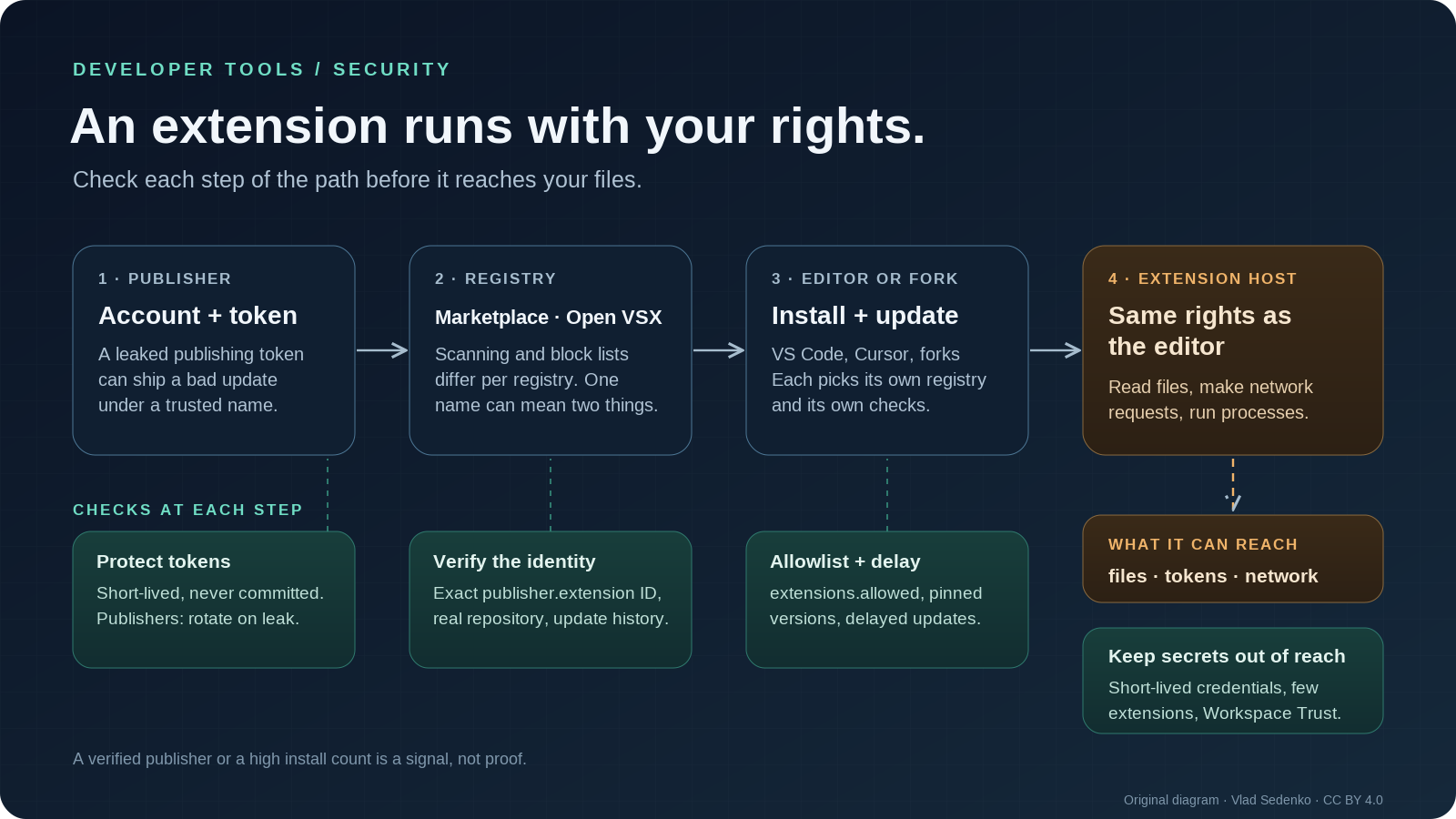
An editor extension is code that runs with your permissions. Treat installing one like adding a dependency to a project that can read your files, your tokens and your network. Most extensions are fine, and the marketplaces do real work to keep it that way. But the registry is where attackers go, and the protection differs depending on which editor and which registry you use.
This article sticks to what the people who ran or found each incident have published, plus the vendors' own documentation. Sources were checked on 11 November 2026; the scheduled publication date is 28 November 2026. Where I could not read a primary source, I left the claim out and say so in the sources section.
Why an extension is not a sandboxed plugin
The extension runtime security documentation states it plainly. The extension host, the process that runs extensions, has the same permissions as VS Code itself, so anything VS Code can do, an extension can do. The page lists examples: read and write files on your machine, make network requests, run external processes, modify workspace settings.
That is the whole threat model in one sentence. A malicious or compromised extension does not need an exploit. It needs to be installed. From there it can read an SSH key, a .env file, a cloud credentials file or the git configuration of the repository you have open, and send it anywhere.
Original diagram by Vlad Sedenko, licensed under CC BY 4.0. It shows the supply-chain path and the checks at each step, not a product interface.
What happened on Open VSX
Open VSX is the open-source extension registry run by the Eclipse Foundation. It is the default gallery in VSCodium, and, according to Cursor's documentation, the source of Cursor's third-party extensions. Two incidents are worth knowing, and they show two different failure modes.
GlassWorm: leaked publishing tokens
In October 2025, the Eclipse Foundation published its own security update. It reports that a Wiz report had identified several extension publishing tokens that developers had inadvertently exposed in public repositories, some of them tied to Open VSX accounts. Eclipse says these exposures were caused by developer mistakes, not a compromise of the Open VSX infrastructure, and that the affected tokens were revoked.
Separately, Koi Security described a malware campaign, named GlassWorm, that used some of those leaked tokens to publish malicious extensions. SecurityWeek's report adds that the injected code was hidden with Unicode variation selectors, so it was not visible in a code editor, and that Koi warned the campaign was self-propagating using stolen developer credentials.
The details are contested, and the contest is instructive. Eclipse says it was not a self-replicating worm in the traditional sense: the malware stole developer credentials that could extend the attacker's reach, but it did not spread autonomously. It also says the reported figure of 35,800 downloads overstates the real number of affected users, because it includes inflated downloads from bots and visibility-boosting tactics. Eclipse removed the known malicious extensions and considered the incident fully contained on 21 October 2025.
The lesson is not about a specific number. A stolen publishing token lets an attacker ship a malicious update under a trusted name, and the first people to receive it are the ones who trusted the name. Koi's own post is no longer reachable at its original address (it redirects to a Palo Alto Networks product page), so what I report about their claims comes from Eclipse and SecurityWeek.
"Evil twins": same name, different publisher
In August 2026, Manifold Security published its analysis of 77 Open VSX extensions. Between 26 July and 1 August 2026, its monitoring found packages that republished the name, namespace and description of a real VS Code Marketplace extension at a low version number, almost always 0.0.1, from an account that did not own the namespace or belong to the original author. All of them contacted one domain, registered on 15 July 2026.
Manifold reports two groups. Fifty-eight were lightweight and mostly sent a hostname. Nineteen sent much more: the OS username, workspace path, the git remote host and organisation, the commit email domain, branch, HEAD commit and, on CI systems, values such as the repository name. Manifold found no access to source code, credentials, tokens, SSH material or browser data. Its main point is about disclosure: the listings described the behaviour as "telemetry" and said CI values were never sent, while the code did send them. As of 3 August 2026 the packages had been removed from Open VSX.
Two details matter for your own habits. The extensions had no real function, only a beacon. And the researchers say agents, devcontainer configs and provisioning scripts that install by name make a squatted name on one registry indistinguishable from the real one on another. An extension ID that you copy from a README is only as trustworthy as the registry that resolves it.
What Open VSX changed
In January 2026 the Eclipse Foundation announced that the registry had relied mainly on post-publication response and would add checks before publication: detecting clear name or namespace impersonation, flagging accidentally published credentials, scanning for known malicious patterns and quarantining suspicious uploads for review. The plan was to monitor in February and move toward enforcement in March. The October post also lists shorter default token lifetimes and easier revocation. I did not verify the rollout status after the announcement, so treat these as stated plans and check Eclipse's current documentation.
What VS Code itself does
The same security page describes the Visual Studio Marketplace protections. They are worth knowing precisely, because they are layered:
- Malware scanning of each new extension and each update, using several antivirus engines. The extension is not published publicly until the scan is clear.
- Dynamic detection: the extension's runtime behaviour is checked in a sandboxed clean-room VM.
- Verified publishers: a blue check mark means the publisher proved domain ownership and has been in good standing on the Marketplace for at least six months.
- Unusual usage monitoring of downloads and usage patterns.
- Name squatting protection: authors cannot take the names of official publishers such as Microsoft or Red Hat, or of popular extensions such as GitHub Copilot.
- Block list: a verified malicious extension is removed and added to a block list, and VS Code automatically uninstalls it if it was installed.
- Signature verification: the Marketplace signs extensions and VS Code checks the signature when you install.
- Secret scanning of newly published extensions, which blocks publishing if credentials are found.
A Microsoft Marketplace security post adds rescanning shortly after publication, periodic Marketplace-wide rescans, manual review by security engineers of flagged packages, and community reporting.
On your side, VS Code shows a publisher trust dialog from release 1.97 the first time you install from a third-party publisher. Trusting the publisher of an extension pack also trusts the publishers of its dependencies. One important exception from the docs: when you install through the command line, the publisher is not automatically trusted.
Two settings from the extensions documentation are easy to overlook. Auto-update waits 12 hours by default after an update is published (extensions.autoUpdateDelay), which gives scanners and reporters a short window. Setting the delay to 0 removes it. You can also disable auto-update with extensions.autoUpdate.
None of this makes the Marketplace a guarantee. The docs describe layers that reduce risk. They do not claim that a malicious extension can never be live for a while.
Forks: Cursor, VSCodium and others
VS Code forks do not automatically use the Visual Studio Marketplace. The Marketplace terms of use say its offerings are intended for use only with Visual Studio, Visual Studio Code, GitHub Codespaces and Azure DevOps, which is why forks commonly point to Open VSX. What I verified:
- VSCodium: its documentation says the default
product.jsonuses open-vsx.org as the extension gallery, and warns you will likely miss some extensions known from the Marketplace. It documents how to switch the gallery. - Cursor: its extensions documentation says it uses Open VSX for third-party extensions, but routes search and downloads through its own marketplace proxy, which runs automated malware and supply-chain analysis and keeps a blocklist. It warns that the same
publisher.extensionname can point to different publishers or code on Open VSX than on the Microsoft Marketplace, and says to treat extension IDs like dependencies. For teams it documents a marketplace install cooldown (default 0, disabled), allowed-extension rules (also via theAllowedExtensionspolicy) and optional signature verification of Open VSX extensions. It adds that no single control replaces the others.
I could not confirm the extension registry behaviour of other forks from their documentation (Windsurf's site now redirects to a Devin Desktop page, and I found no Kiro extension page that loaded), so I make no claims about them. Check the documentation of the editor you use rather than assuming it behaves like VS Code or like Cursor.
The practical difference is not "forks are unsafe". It is that the checks are different, that Open VSX is a smaller registry with a younger security programme (by Eclipse's own account it relied mainly on after-the-fact removal until 2026), and that you cannot assume the Marketplace protections listed above apply to it.
A checklist before you install
None of these checks takes long, and they add up.
- Install from the exact identifier. Compare the full
publisher.extensionID with the project's own documentation. A similar name or a missing publisher is the evil-twin pattern. - Check the publisher. On the Marketplace, look for the verified check mark, and treat the trust dialog as a real decision. On Open VSX, check that the publisher matches the project's own repository and release page.
- Open the repository. Is there one, is it the real project, and does the published version match the repository's releases? A listing with no repository and no issue tracker is a weaker signal.
- Read the update history. A package at version 0.0.1 under an established name, a long-dormant extension that suddenly ships an update, or a change of publisher deserves a closer look.
- Do not trust the install count. The Eclipse post says the GlassWorm download count included inflated downloads from bots and visibility tactics. Ratings can be gamed too. A number is not proof.
- Look at what it needs. Check the activation events and contributed commands in the manifest. An extension that activates on every start (
*) or on startup, with no clear reason, deserves a question: why does a theme or a formatter need to run all the time? - Ask whether you need it. Many extensions duplicate features VS Code now has. The fewer you run, the smaller the surface.
- Delay updates. Keep the update delay, or turn auto-update off for extensions that handle secrets, and update deliberately.
- Pin versions for the ones that matter. The
extensions.allowedsetting can restrict an extension to listed versions. The documentation says version ranges are not supported, so list each approved version individually. - Do not open untrusted projects with everything enabled. Workspace Trust exists to decide whether code in a folder, and extensions acting on it, may run without explicit approval.
If you install a VSIX file by hand, the allowed-extensions documentation warns that the rules use identifiers declared in the package and do not verify its origin. Download VSIX files only from the project's own release page.
What a team should do
Individual care does not scale, so move the decision into policy.
- Use an allowlist. VS Code's
extensions.allowedsetting, available from version 1.96, controls which extensions can be installed and enabled, by publisher, extension ID, version and platform. By default everything is allowed. With an allowlist, anything that does not match is blocked, and a blocked extension that was already installed is disabled. More specific entries win over general ones, and"*": falseblocks everything not otherwise allowed. Organisations can enforce the same thing with theAllowedExtensionspolicy through device management, which overrides user settings. - Prefer a short list over a long one. Start with the extensions that supply a language, a toolchain or a remote environment, and add others by request with a named owner.
- Review additions. A request should say what the extension does, who publishes it, where the source is and why a built-in feature is not enough.
- Remove what is unused. Review the installed list on a schedule (
code --list-extensionsprints it) and drop anything nobody can justify. - Keep secrets out of reach. Short-lived credentials, no long-lived tokens in plain files in the workspace, and separate profiles or machines for work with production access reduce what a bad extension can read.
- Have a response plan. If an extension is reported, know how to find who has it, remove it and rotate the credentials that were on that machine. The Marketplace block list uninstalls known-bad extensions for you, but only for ones it knows about.
If you want a second pair of eyes on your developer workstation setup, build pipeline or application, a web application security review can include the tooling around the code, not only the code itself.
Sources
Primary sources read on 11 November 2026, before the scheduled publication date.
- Extension runtime security: extension host permissions, publisher trust from 1.97, verified publishers, Marketplace protections, block list, signatures.
- Extension Marketplace: auto-update and the 12-hour default
extensions.autoUpdateDelay. - Enterprise extensions: allowed extensions:
extensions.allowed(from 1.96), version pinning,AllowedExtensionspolicy, VSIX caveat. - Security and Trust in Visual Studio Marketplace: rescanning, periodic scans, manual review, community reporting.
- Visual Studio Marketplace terms of use.
- Eclipse Foundation: Open VSX security update, October 2025: leaked tokens, GlassWorm, the 35,800 figure, containment on 21 October 2025.
- Eclipse Foundation: Strengthening supply-chain security in Open VSX (28 January 2026): pre-publish checks and rollout plan.
- SecurityWeek: Open VSX Downplays Impact From GlassWorm Campaign: variation selectors, Koi's claims as reported.
- Manifold Security: 77 "evil twin" Open VSX extensions: dates, domain, the two payload groups, removal on 3 August 2026.
- Cursor documentation: Extensions and VSCodium extensions documentation.
- Workspace Trust: Restricted Mode and approval before code in a folder runs.
Not used: the original Koi Security posts (GlassWorm and TigerJack) now redirect to a Palo Alto Networks page, and The Hacker News and Visual Studio Magazine returned access errors to automated requests. Claims that only those pages supported are left out.